This option will return your Office to a 28-day trial and give the user a 'breathing-space' to transfer data, find a legal key or an alternative to Office. It is not a long-term solution.
a) In the Search box (near the start button) type Folder Options and click on the top result of the search. Once the Folder Options box appears, click on the View tab. About halfway down the list you will see the option to 'Show hidden files, folders and drives' click a bullet in that option, then Apply and Ok
b) Next, navigate to:-
C:\Program Files (x86)\Common Files\microsoftshared\OfficeSoftwareProtectionPlatform
In that folder, you should see a file called: OSPPREARM
c) Double click on OSPPREARM and you will see a small black screen flash up, then disappear.
d) Close all screens.
e) Office will now return to a 28-day trial. However, the activation screen will still appear when you open Word, Outlook, etc. Simply close that screen by clicking on the X at top right. You can now continue to use your chosen application as normal.
f) Most people will want to access Outlook to recover emails, etc. Is there an alternative to Outlook? Yes, there is. It's called Thunderbird, it's developed by Mozilla and, best of all, it's FREE.
NOTE: Sorry, but we cannot answer any questions on this subject. If in difficulty, please re-read the steps carefully.
Friday, 23 November 2018
Microsoft Office 2010 De-Activates
First of all, I must stress that this article refers to Microsoft Office 2010 with a LEGAL license or key ONLY.
We have recently been getting reports of legal versions of Microsoft Office 2010 suddenly de-activating after having worked for long periods of time. Sometimes after a Windows Update. Do you get these screens after trying to re-activate over the internet:-


Sadly, the news is not particularly good. For the following reasons:-
1) You will not be able to use customer telephone support to report the fault as it has been withdrawn by Microsoft.
2) Microsoft have tightened up security on this particular product. This means that a key designed for ONE computer cannot be used for multiple pc's. Attempts to do so can de-activate Office 2010 on all installations!
So, sharing a single-use key with family and friends can lead to all installations being deactivated by Microsoft.
3) Once the key has been de-activated by Microsoft, you will mot likely never be able to use that particular key again.
1) You could try buying a new fresh key over the internet (Ebay, etc) but these are very scarce, often do not work and are quite expensive. As far as we know, Microsoft do not sell fresh keys for this version of Office, as they would much rather you bought one of their current products.
2) If you are not using Outlook, then there are FREE alternative office versions such as LibreOffice, Apache OpenOffice, WPS Office, etc.
3) A temporary solution to enable you access to Outlook emails and Data in particular can be found in our next blog - 'Temporary Access to a De-Activated Office 2010'
We have recently been getting reports of legal versions of Microsoft Office 2010 suddenly de-activating after having worked for long periods of time. Sometimes after a Windows Update. Do you get these screens after trying to re-activate over the internet:-


Sadly, the news is not particularly good. For the following reasons:-
1) You will not be able to use customer telephone support to report the fault as it has been withdrawn by Microsoft.
2) Microsoft have tightened up security on this particular product. This means that a key designed for ONE computer cannot be used for multiple pc's. Attempts to do so can de-activate Office 2010 on all installations!
So, sharing a single-use key with family and friends can lead to all installations being deactivated by Microsoft.
3) Once the key has been de-activated by Microsoft, you will mot likely never be able to use that particular key again.
PART RESOLUTIONS
1) You could try buying a new fresh key over the internet (Ebay, etc) but these are very scarce, often do not work and are quite expensive. As far as we know, Microsoft do not sell fresh keys for this version of Office, as they would much rather you bought one of their current products.
2) If you are not using Outlook, then there are FREE alternative office versions such as LibreOffice, Apache OpenOffice, WPS Office, etc.
3) A temporary solution to enable you access to Outlook emails and Data in particular can be found in our next blog - 'Temporary Access to a De-Activated Office 2010'

Saturday, 20 October 2018
Alter The Size of Windows Desktop Icons
Windows will give you the opportunity to resize your desktop icons to three standard sizes - small, medium and large. Changing sizes is an easy task, even for the beginner. Simply position your cursor in an empty area of the desktop and right-click your mouse. Follow the 'view' menu and make your choice by left-clicking on either 'Large' 'Medium' or 'Small' icons (see picture).

Customise Icon Size
But what if that isn't good enough? Have you ever wondered how to customise the size of all your desktop icons to suit you? Try this quick and simple shortcut:
With all other Windows closed, left-click on any icon on your desktop to highlite it, then hold down the Ctrl key on your keyboard and using the scroll wheel on your mouse, adjust the size of all your icons.

Once you have chosen the size you want, release both the ctrl key and scroll wheel, and your icons will remain the chosen size until you alter them again using the same method.
Sunday, 8 October 2017
Microsoft Surface Pro 3 "Dead"
The Microsoft Surface Pro 3 was/is a very expensive tablet/laptop. However, there is a serious growing fault. You try to turn it on one day and....nothing! It's totally 'Dead'.
Searching the Internet all you see is 'push this button, hold that button', etc. Nothing works.
However, we have a very good success rate of getting everything up and running and back to normal. The fix is NOT free and we need to have the tablet and charging adapter for less than a day. If we can't fix it, there is NO fee.
Please contact us through the website: www.pcpartners.uk.com
Saturday, 20 February 2016
Laptop Power Jack Socket Repair
Laptop Power Jack Socket Repair

No matter how careful you are with your laptop, the power socket will eventually need replacing.
It's true to say that with most laptops this is not an easy job. It involves the careful disassembly of the laptop itself, the removal of the motherboard and some very skillful soldering! Trying to do-it-yourself often results in disaster, whereby the laptop becomes totally unusable! Don't take that chance!
At PC Partners we are fully qualified to safely disassemble your laptop and perform any soldering that is necessary. We carry a wide range of parts and the whole process usually takes 1-3 days. Urgent repairs are a speciality.
Visit our website for more details PC Partners
Wednesday, 25 December 2013
Cryptolocker - We Can Help!
Make no mistake, the Cryptolocker virus is going to cause a lot of heartache in the next few months, or possibly years.
But what is Cryptolocker and why should you care? Well, if you switch on your computer and are greeted with this screen...
 |
| If you see this screen, your docs, pics and music are inaccessible! |
...then you are in trouble. For this is no idle threat. Your personal files ARE indeed encrypted and you will not be able to access them. To make matters worse, to release your files, you will have to buy a key before the countdown clock expires or your files will be locked forever!
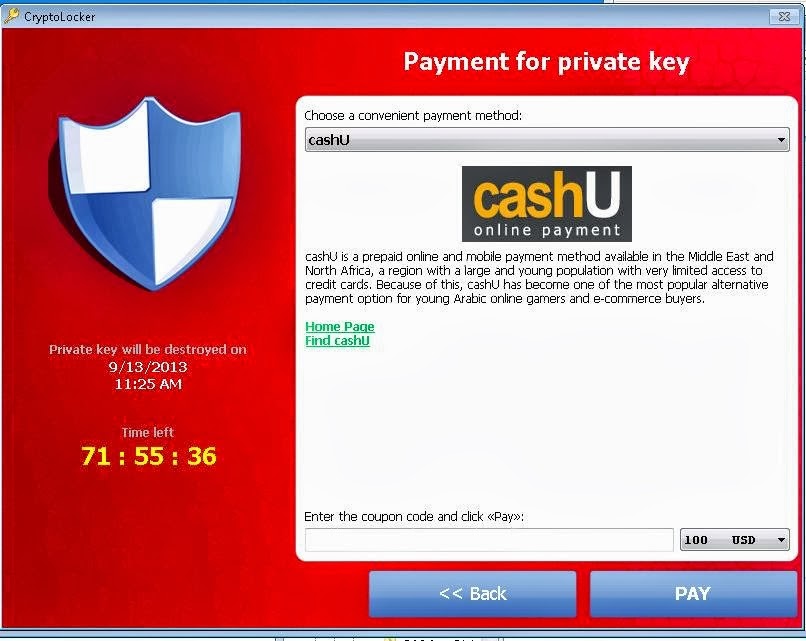 |
| Choose a 'convenient' payment method!!! |
The difference between this and other 'ransomware' is that the threat is real and the release key is virtually unbreakable.
Running Anti-Spyware software can remove the infection but it will not remove the encryption. Your files will remain locked!
SHOULD I PAY THE RANSOM?
Definitely NOT! There is NO guarantee that you will be sent the unlock code or that your PC will not immediately be re-infected (and you will have to pay over and over again)!
THE GOOD NEWS
We have had great success in recovering files locked under this virus. It is a time consuming process and we would require your pc for several days, but you will have your precious data returned to you and the infection removed. Please contact us through our Website for more details.
Thursday, 5 December 2013
Use Windows ReadyBoost to Improve PC Performance
How to Use ReadyBoost to Speed Up Windows 7
One of the most useful features of Windows 7 that is often overlooked is ReadyBoost. It was first introduced with Windows Vista but many users found the technology less than impressive. However, Windows 7 has seen a vast improvement and can lead to significant gains in computer speed and data handling.
ReadyBoost is simple to set up and requires no special skills. The only item required is a blank working USB Flash Drive (aka USB Memory Stick) between 1-8Gb in size. Although smaller and larger sizes will work as well.
As the USB drive will be connected to your pc for some considerable time, it would be best to choose a location somewhat out of the way - say, at the rear of your computer.
Ok, let's start:-
1) Plug your USB Flash Drive firmly into the pc and watch for this screen to appear on the monitor:

2) Click on 'Speed Up My System' and the next screen will appear:

3) Choose the option 'Dedicate this device to ReadyBoost' Apply & OK.
ReadyBoost is now set-up and operating.
You will see that in My Computer it shows as a extra drive with a red line underneath it. This informs the user that it cannot be used to store data.
If at anytime the USB Flash Drive is temporarily removed or changed, the ReadyBoost set-up procedure will have to be repeated.
Tuesday, 19 November 2013
DON'T Change Your Email Password!
This article concerns those users who use a desktop email client such as Outlook Express, Thunderbird, Outlook or Windows Live Mail. In other words, where emails are stored on the computer and not accessed via a webpage.
Every now and then, when you open your email client, you may get a message telling you that your email cannot be downloaded because your username or password is incorrect.
If you've had no problem downloading your email in the past, then this standard message is going to be very misleading. The best advice is NOT to panic and NOT to change any details.
If you can still access the internet through your web browser, then the fault is very likely to lay with your Internet Service Provider (ISP). All ISP's have problems now and again, and these are usually speedily fixed. You should give your ISP at least 12 hours to fix the problem.
Check the Service Status on the ISP's website to confirm any problems they might be experiencing. You could even access your email through the online webmail facility (you will need your username and password to login).
If the user loses patience and starts to change usernames and passwords, these will be remembered by the email client and when the ISP comes back online, the username and password really will be WRONG!
Monday, 4 November 2013
Laptop Overheating Explained
As a laptop gets older, one of the most common faults is overheating. There are two main causes: blockage of the cooling system by dust and fluff, or a faulty fan. Bad design can also be to blame but we shall not be looking at that cause here.
How Does The Heating System Get Blocked?
Laptops produce a significant amount of heat that is generated by the CPU, GPU and other components; this needs to be evacuated as quickly as possible. Without getting too technical, a fan draws cool air in and directs it over a radiator where the heat has been directed by copper pipes (similar to a car engine).
As a result of the cool air being drawn in by the fan, particles of dust and fluff are also sucked in. It's these particles that collect in front of the radiator, building up over time to form an impenetrable barrier. Cool air cannot pass over the radiator and the components overheat as a result.
 |
| Dust and Fluff Can Clearly Be Seen on the Fan Intake |
A faulty, or underperforming fan can occur due to a failed motor, missing blade(s), or some form of obstruction. All fans eventually fail and an early replacement can extend the life of a laptop considerably.
 |
| This Fan is Totally Chocked With Fluff and Dust! |
Signs of Overheating
The laptop base gets VERY hot! It may be too hot to put on your lap!
Little or no air coming from the exhaust port.
The laptop cuts out or throws up a blue screen.
The Laptop becomes very slow.
The fan becomes noisy.
 |
| A 'Carpet' of Fluff Completely Blocking the Cooling Radiator |
Consequences of Overheating
Most laptops have a thermal cut-out in place that detects overheating and stops the machine working. However, this is not always quick enough to prevent damage to the CPU or GPU. Once this happens, there is no alternative but to replace the processors (very expensive), or scrap the laptop!
Once a laptop is overheating, its useful life is considerably reduced.
How We Repair
Despite mis-guided advice to the contrary, there is only one solution to this problem, and that is to dismantle the laptop, remove the motherboard and clean out the accumulated dust blockage by hand. It cannot effectively be removed by vacuum cleaner or poking around with a paper clip!
Renewal of a faulty fan also requires the removal of the motherboard.
Our repairs include the complete removal of all particle blockages and a complete cleaning of the internal laptop cavity and components. Should the fan require lubricating or replacing, we can also include that procedure.
Our work is carried out extremely carefully and by our most experienced technician. After the procedure, you will be able to work normally once again, as the operating system and data will be unaffected.
Monday, 17 June 2013
Back-Up Your Data, Now!
At PC Partners we are constantly advising our customers to back-up their data. The complete loss of pictures, documents and music due to hardware failure can be a real shock.
First of all, let's remind ourselves of what a back-up really is. It's a copy of your data in TWO or more places. It is not a transfer of data to an external storage device that removes it from the original location - unless you are making two or more copies on different devices in separate physical locations.
Even back-up devices can fail and, if you only have one data copy on one device, the risk of losing everything remains the same.

You can back-up to various devices such as an external hard drive, USB memory stick, online cloud-based facilities or optical storage (cd's, dvd's etc.). There are other devices, but you get the idea.
I don't intend to discuss the merits of each device, but I do want to stress that ANY back-up, on ANY device is better than nothing.
Wherever you choose to store your data, make sure you do it regularly. Once a week for the light home user, or everyday for the heavy data generators (authors, etc).
Always keep a copy off-site. That is, with a neighbour, a relative or at work.
Accidents can happen - fire, flood, children, parents and dogs have all been known to destroy precious data.
Make your back-up NOW and sleep better at night.
If you think you have lost data, visit our data recovery page, we can help.
First of all, let's remind ourselves of what a back-up really is. It's a copy of your data in TWO or more places. It is not a transfer of data to an external storage device that removes it from the original location - unless you are making two or more copies on different devices in separate physical locations.
Even back-up devices can fail and, if you only have one data copy on one device, the risk of losing everything remains the same.

You can back-up to various devices such as an external hard drive, USB memory stick, online cloud-based facilities or optical storage (cd's, dvd's etc.). There are other devices, but you get the idea.
I don't intend to discuss the merits of each device, but I do want to stress that ANY back-up, on ANY device is better than nothing.
Wherever you choose to store your data, make sure you do it regularly. Once a week for the light home user, or everyday for the heavy data generators (authors, etc).
IF YOU CANNOT AFFORD TO LOSE ANY DATA UNDER ANY CIRCUMSTANCES...
Always keep a copy off-site. That is, with a neighbour, a relative or at work.
Accidents can happen - fire, flood, children, parents and dogs have all been known to destroy precious data.
Make your back-up NOW and sleep better at night.
If you think you have lost data, visit our data recovery page, we can help.
Sunday, 16 June 2013
Can't Like or Dislike Youtube Videos Anymore?
A recent update by Google has made it seemingly impossible for some users to like or dislike Youtube videos.
The answer is that from now on, you will only be able to like or dislike after you have watched the whole video! And even then the active thumbs up or thumbs down buttons have moved the to top of the finished video.
Don't like this change? You are not alone. Google seem to be making a habit of upsetting users these days with their seemingly arbitrary meddling. All in the name of making even more profits!
The answer is that from now on, you will only be able to like or dislike after you have watched the whole video! And even then the active thumbs up or thumbs down buttons have moved the to top of the finished video.
Don't like this change? You are not alone. Google seem to be making a habit of upsetting users these days with their seemingly arbitrary meddling. All in the name of making even more profits!
Friday, 26 April 2013
More Spam with Outlook.com!

As an IT company we have several Hotmail accounts for testing purposes only. They have been set-up for years and never used to mail third-parties. Our spam boxes have remained empty up until now.
However, since being transferred to Outlook.com, our spam count has suddenly soared from zero to ten a day, on all accounts!
Is this just coincidence or has the unthinkable happened? Are Microsoft really selling email addresses on?
Has anyone else noticed a sudden increase in spam since the roll-out of Outlook.com?
Saturday, 20 April 2013
Browsing The Internet Without Ads!
We all know how irritating it is when you are bombarded by advertising on practically every website you visit. Sometimes it's even difficult to tell the ads from the content. Let's face it, no one visits a website for the advertising, do they?

Before: Weatherbug site with Three blocks of Ads
What can you do? Here's one of the best solutions; it works and it's free!
First of all, visit here and pick up the latest version of Mozilla Firefox browser. Once you have set up the browser, make sure you right-click on the top bar and put a tick by 'Menu Bar'. You'll then see the standard 'File Edit View' menu appear at the top of the browser.
Secondly, from this top menu, click on Tools and then Add-ons. That will open a new tab for the Add-ons Manager. From the left menu, click on Get Add-ons .
To the top right of the tab, you will see a search box. Type in 'Adblock Plus 2.2.3' (without the ') and click search. If the top results do not show Adblock Plus, click on 'See All 85 Results' at the bottom of the list. The next tab should have Adblock Plus at the top of the list. Click ' +Add to Firefox ' and follow the instructions. Adblock will work after you close down firefox and open it up again.
Go to the website with the advertising that annoys you most and test it out. You should notice a big difference. If you want more ads to disappear, carry out the instructions in the previous paragraph and this time search for and install 'Ads no more 2.1'. It's quite safe to have the two add-ins running at once.


After: Weatherbug site with all ads gone!
The examples shown here with the Weatherbug site illustrate just what can be achieved. There's nothing quite as satisfying as visiting a favourite website that was once infested with ads, to find that they have all disappeared and you're left with pure content...which after all, is what you went there for in the first place!
Tuesday, 26 March 2013
Create A Windows 8 Recovery USB Drive

If you've just bought a Windows 8 laptop, you might have noticed that it does not come with a COA (Certificate Of Authenticity). That's the blue sticker on the bottom of the laptop with the Windows key printed on it.
This state of affairs can have serious ramifications should the hard drive fail terminally. If it does, the key is lost along with the recovery partition and the user will have to buy a fresh copy of Windows 8. Good news for Microsoft but very bad news for the user.
Luckily, Windows 8 allows the user to back-up the operating system and the recovery partition on to a USB memory stick. We recommend all users carry out this procedure as soon after buying a new Windows 8 laptop as possible.
Here's how to do it :-
1) In the Search utility type: create a recovery drive and click on the result.
2) Say 'Yes' to the User Account Control warning.
3) Make sure 'Copy the recovery partition from the PC to the recovery drive' is ticked and click Next -

4) At the next screen, you will be advised how large your USB drive should be (usually about 8Gb).
5) Insert a USB drive of the recommended size and once recognised, click next

6) You will be warned that everything on the USB drive will be deleted. Click Create -

6) Copying will now take place. Do not disturb the computer during this time.


7) Click finish, DO NOT DELETE the recovery partition if offered, remove the USB drive, label it, and store it in a safe place.
8) You can make as many Recovery USB Drives as you wish, BUT each one is matched to the computer you created it on. Do not try to use it on another computer.
Friday, 22 March 2013
Turn Off Data Harvesting in Outlook.com
Microsoft have recently been complaining publicly about Google's practice of gathering data from Chrome and Gmail so that advertising can be targeted for the individual user preferences. How noble.
Wait a minute, not so noble. Guess who's now doing exactly the same thing? Yep, Microsoft!
With the transference of Hotmail accounts to Outlook.com, Microsoft has turned on all the data harvesting tools by default.
But, at least this can largely be disabled by the user, even though the link to the menu is tiny and most people would miss it altogether.
We're going to tell you how to turn off nearly all the data tracking -
Open your account in Outlook.com. In the bottom right-hand corner, you will see a tiny cogged wheel. Click on that and you will be taken to a page called My Data.
Click the link at the top of this page called My Choices. All the data gathering tools will be turned on as indicated by a green tick. If you click on the top tick, you will change them all to a red cross.
However, if you click on the More Services link, you will see that Microsoft are collecting even more data on you through Windows, MSN and XBox.
This does not mean you will be advertising free on the Outlook.com site, just that your browsing data, email content, etc., will not be collected...for the time being anyway!
Check these settings regularly as they could easily be turned back on by an Outlook.com update.
Wait a minute, not so noble. Guess who's now doing exactly the same thing? Yep, Microsoft!
With the transference of Hotmail accounts to Outlook.com, Microsoft has turned on all the data harvesting tools by default.
But, at least this can largely be disabled by the user, even though the link to the menu is tiny and most people would miss it altogether.
We're going to tell you how to turn off nearly all the data tracking -
Open your account in Outlook.com. In the bottom right-hand corner, you will see a tiny cogged wheel. Click on that and you will be taken to a page called My Data.
Click the link at the top of this page called My Choices. All the data gathering tools will be turned on as indicated by a green tick. If you click on the top tick, you will change them all to a red cross.
However, if you click on the More Services link, you will see that Microsoft are collecting even more data on you through Windows, MSN and XBox.
This does not mean you will be advertising free on the Outlook.com site, just that your browsing data, email content, etc., will not be collected...for the time being anyway!
Check these settings regularly as they could easily be turned back on by an Outlook.com update.
Microsoft Office 2010 Starter Edition Retired for Windows 8
If you are running Windows 7 or Vista, you may be using Microsoft Office 2010 Starter Edition. Briefly, it gives you a fully featured Word and Excel package in return for a small square of advertising. All for free.

This has proved very useful for ordinary folks who want to write the occasional letter or create a small speadsheet without having to pay huge amounts of money for the full edition of Office.
But this small act of generosity is against all that Microsoft believe in and the bean counters at MS have decided that they can bear it no longer and Office Starter Edition for Windows 8 has been withdrawn. Microsoft cite incompatibilities with Windows 8; which is strange as the full edition of Office 2010 works just fine with the latest operating system.
So, if you're running Windows 7 and Office Starter Edition, do not be tempted to upgrade to Windows 8, or you will lose your Starter Edition and have to find an alternative.
Talking of alternatives, why not try Open Office. It is fully functional and compatible with all the MS Office incarnations. We highly recommend it. You can download it Here.


This has proved very useful for ordinary folks who want to write the occasional letter or create a small speadsheet without having to pay huge amounts of money for the full edition of Office.
But this small act of generosity is against all that Microsoft believe in and the bean counters at MS have decided that they can bear it no longer and Office Starter Edition for Windows 8 has been withdrawn. Microsoft cite incompatibilities with Windows 8; which is strange as the full edition of Office 2010 works just fine with the latest operating system.
So, if you're running Windows 7 and Office Starter Edition, do not be tempted to upgrade to Windows 8, or you will lose your Starter Edition and have to find an alternative.
Talking of alternatives, why not try Open Office. It is fully functional and compatible with all the MS Office incarnations. We highly recommend it. You can download it Here.

Saturday, 16 March 2013
The Memory Stick Massacre
Many of our customers have accumulated a drawer full of USB memory sticks, most of them broken. When I say broken, I mean they no longer function as they should, rather than being simply smashed to bits.
Is this memory stick massacre necessary? Are they of such poor design that they inherently stop working after a few weeks?
The answer to both questions is no. By taking a few simple precautions, you could extend the life of your memory sticks considerably and save some money into the bargain.

Memory sticks require power (5 volts) and it gets this from the USB slot. Each time the stick is inserted and withdrawn, a tiny arc of current is formed across the contacts. Under normal circumstances, this has little effect on the electronics within, but when the stick is withdrawn whilst being written to, the arc is powerful enough to short across the neighboring contacts. The result...a blown memory stick!

If that last paragraph made you glaze over, it doesn't matter. Just follow these few guideline for extended memory stick life:
1) Always use the 'Safely Remove Hardware' feature on the bottom right of the screen, near the clock.
2) Never remove a memory stick whilst it's still writing or receiving information.
3) Never use a faulty memory stick after it has failed. It could kill the USB socket. Throw it away.
4) Always make sure the memory stick is pushed fully into the socket.
5) Blown USB sticks will rarely work normally again. Don't collect them, recycle them responsibly at your local recycling facility.
6) Always make a backup of your memory stick information.
7) And finally, if you have a faulty memory stick with information on it that needs to be recovered, don't keep putting it into different pc's or laptops to see if it might magically spring into life....it won't, and you might destroy the information beyond recovery. Take it to a reputable Data Recovery company like PC Partners to be assessed.
Friday, 22 February 2013
FREE Website Design Software
Compared with 5 or even 10 years ago, there are now very few free website design programs; especially highly specified ones.
Kompozer is one such program. It's fully WYSIWYG (What You See Is What You Get), with a raw HTML tab and a split tab of the two. It boasts a markup cleaner and a W3C call function to validate your HTML against current standards. Available to suit Windows, Mac, and Linux, it has a strong focus on standards compliance and clean code.
That is not to say Kompozer is easy to use if you've never designed a website before. It would certainly require plenty of homework on how to use its facilities properly. But, it is free and on an almost comparable level with many of the design packages costing many hundreds of pounds.
Let's have a look at some screenshots:


You can download the full, free version from here:-
Kompozer Download
Kompozer is one such program. It's fully WYSIWYG (What You See Is What You Get), with a raw HTML tab and a split tab of the two. It boasts a markup cleaner and a W3C call function to validate your HTML against current standards. Available to suit Windows, Mac, and Linux, it has a strong focus on standards compliance and clean code.
That is not to say Kompozer is easy to use if you've never designed a website before. It would certainly require plenty of homework on how to use its facilities properly. But, it is free and on an almost comparable level with many of the design packages costing many hundreds of pounds.
Let's have a look at some screenshots:


Kompozer Download
Sunday, 17 February 2013
FREE Movie Software
Avidemux
Avidemux is a name you may not have heard of but if you're interested in video editing and want to make things easy for yourself, then it's a name you want to become familiar with.

This free video editor is designed for simple cutting, filtering and encoding tasks. It supports many file types, including AVI, DVD compatible MPEG files, MP4 and ASF, using a variety of codecs.

As can be seen from the screenshots, the interface is easy and there is plenty of support via the online documentation.

As always, if you don't like it, just uninstall.

If you do like it, there are forums to give you help and advice. Download from this page Avidemux Download
Saturday, 16 February 2013
Secure Your Wireless Router
Most people sigh a breath of relief after they have successfully logged their laptop/tablet/smart phone onto the home router...and then forget it. Forgetting it could get you a criminal record! Let me explain.
It is possible IT savvy criminals to hack into your router and visit illegal websites, or perform illegal acts over the web using YOUR internet connection!
As your router has a unique identifying code linking it to you and your address, any illegal activity will be traced to you. Not a very pleasant thought, especially as this could result in an early morning call by the Police!
Can this scenario be avoided? Absolutely. Here's how...
1) Make sure your wireless router has a password. If unsecured (without a password) anyone within range can log in to your router and, at the very least, use your internet connection for free.
2) Your router password should be changed regularly, say once every six months.
3) The password should be cryptic with letters and numbers. Make it 8 characters or more. Avoid using common names.
4) Keep an eye on the router lights. You will notice that several of the lights will flicker madly when you are using the internet. When nobody is accessing internet, the lights should calm down to an odd flicker now and then. If the lights are still very active 30 minutes after the last user has logged off, you may have a hacker.
5) If your internet connection is unusually slow, you maybe sharing the router with an unknown third-party.
6) If you live in our area, PC Partners can help you secure your wireless network. Otherwise, call your ISP (Internet Service Provider) and they will advise you.
It is possible IT savvy criminals to hack into your router and visit illegal websites, or perform illegal acts over the web using YOUR internet connection!
As your router has a unique identifying code linking it to you and your address, any illegal activity will be traced to you. Not a very pleasant thought, especially as this could result in an early morning call by the Police!
Can this scenario be avoided? Absolutely. Here's how...
1) Make sure your wireless router has a password. If unsecured (without a password) anyone within range can log in to your router and, at the very least, use your internet connection for free.
2) Your router password should be changed regularly, say once every six months.
3) The password should be cryptic with letters and numbers. Make it 8 characters or more. Avoid using common names.
4) Keep an eye on the router lights. You will notice that several of the lights will flicker madly when you are using the internet. When nobody is accessing internet, the lights should calm down to an odd flicker now and then. If the lights are still very active 30 minutes after the last user has logged off, you may have a hacker.
5) If your internet connection is unusually slow, you maybe sharing the router with an unknown third-party.
6) If you live in our area, PC Partners can help you secure your wireless network. Otherwise, call your ISP (Internet Service Provider) and they will advise you.
Subscribe to:
Posts (Atom)